Practice makes perfect, so you need to allow time for learning how to make good recordings. Using a recording studio, you will work with a partner with one of you acting as recording engineer whilst the other is the voice talent.
For 2025-26, students must use the University recording studios. Do NOT make your recordings at home.
Microphone technique
Good technique is important for high quality recordings, and always remember that consistency is crucial, so take a few photos of the setup so you can reproduce it in subsequent sessions.

With a headset microphone, it’s important to place it to one side of the mouth to avoid breath noises
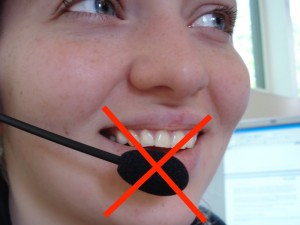
don’t place it below the mouth because you will still get breath noises from the nose
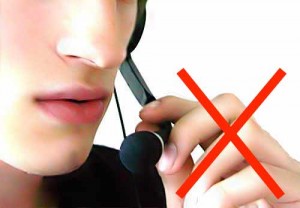
and don’t touch it whilst recording!
With a stand-mounted microphone, again you need the microphone placed to avoid breath noises from the mouth or nose, and kept at a constant distance (20-30cm). Make several test recordings to find a position that sounds good. During the recording sessions, the engineer should keep an eye on your voice talent: don’t let them move around in the chair.
Getting the recording level correct
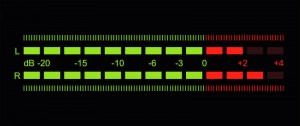
With digital recording, it’s essential that you never ‘hit the red’ when recording because you will get hard clipping and that will sound very bad (as well as potentially interfering with the signal processing we need to do later).
But on the other hand, you do want to record at the highest level possible (what a recording engineer would call ‘hot’) so that you make the most of the available bit depth. Recording at too low a level is equivalent to using fewer bits per sample, and can also make any imperfections in the audio signal chain (such as electrical noise within the microphone amplifier) more obvious.
Recording software
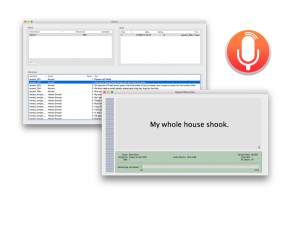
If you’re recording at home on a Mac (students taking Speech Synthesis in 2025-26 must record in a University recording studio, not at home), then you could use CSTR’s SpeechRecorder software that presents each prompt to the voice talent, and saves the recordings in individual files. Here’s the manual. To load your own sentences into this tool, they need to be in Festival’s standard ‘utts.data’ format. SpeechRecorder is already installed on the University studio computers. You do not need to install it.
For non-Mac computers, there is a Python alternative to SpeechRecorder created by previous student Tim Loderhose, and now updated and maintained by Dan Wells.
Making good, consistent recordings
You will find that you can probably record for a maximum of 2 hours at a time, with short breaks every 30 minutes or so. After that your voice will start to become creaky. Stop when this happens: you need your voice to stay consistent (it may also be damaging to your voice to speak for excessively long periods). Some recording tips:
- Switch your phone, and that of anyone else in the studio, off or place it in ‘airplane’ mode (not just silent mode) to avoid interference.
- Take a bottle of water with you and take frequent sips during recording.
- Write down (or take a photos of) the recording levels you are using and set the same levels in every session.
- Ensure chair, microphone, etc. are positioned the same way in every session (again, photos are helpful here).
- Make sure any ventilation fans are switched off during recording.
- When you are speaking, ensure that you are not fidgeting, playing with any of the cables, your hair, etc…
Of course, you should make plenty of test recordings at the outset, and listen back to them carefully over headphones to spot any problems. Once you have perfected your technique, go ahead and record the ARCTIC ‘A’ set. You should build a voice from this, to confirm that you have made sufficiently-good quality recordings, before returning to the studio to record your own material.
During the actual recording, try to get each sentence correct in a single attempt. Don’t waste time on multiple takes, except in those few cases where you made a major error. The engineer should keep notes about any sentences that need checking after the recording session.
At the end of each session, make back up a copy of your recordings on a memory stick (if using a recording studio), and/or back them up somewhere secure.
Now follow the instructions below to book the studio.
Log in- Using the University recording studiosThe University has two recording studios available for you to use.
Step 1: read this
Studios
You will use one of the two available studios and should use the same studio to make all your recordings. The microphone and other equipment may differ between them, which will make the recordings sound different. You do not want to build a voice from data with varying recording conditions.
Recording is done by pairs of students
For recording, you need to form pairs. One of you will be the Voice Talent, and the other will be the Engineer. Then you’ll swap places. If we have an odd number of students, there might be one group of 3. We formed pairs in the first class, but if you missed out then try again in the second class (tell Simon at the start of the class that you are looking for a partner).,
Choose a studio
We need to balance the usage of the two studios. To pick your studio, inspect the available training sessions here (scroll down to see both tables, one for each studio) and select the studio with the fewest people currently signed up for training.
Step 2: book a training session
Training is done in groups of 4 (two pairs). Please try to make up full groups, so prefer slots where there are already two people signed up in the sheet.
Appleton Tower (basement room B.Z.31)
- Check the available training sessions here (make sure to look at the “Appleton Tower” part of this workbook)
- Send an email to the PPLS Studio Technician ppls.studio@ed.ac.uk with subject “Speech Synthesis training session booking request (Appleton Tower)” and include both of your names. List all the sessions that your pair is available for, in order of preference. The Studio Technician will enter your pair into the sheet above, and confirm by email.
Informatics Forum sound studios (basement room B.Z16)
- Check the available training sessions here (make sure to look at the “Informatics Forum” part of this workbook)
- Send an email to the Tutor Jinzuomu Zhong <jzhong@ed.ac.uk> with subject “Speech Synthesis training session booking request (Informatics Forum)”. List all the sessions that your pair is available for, in order of preference. The Tutor will enter your pair into the sheet above, and confirm by email.
- Your studio is located in the Informatics Forum, where you must sign in at reception in order to enter this building. Then proceed down the stairs which are in the middle of the atrium. Remember to sign out when you leave.
Step 3: book recording sessions
Do not book any recording sessions until you have completed the training session!
Once you are trained, you may book a recording session in your studio. In order to maximise availability of the studios for everyone, each booked session should be a maximum of 2 hours in duration. Quickly cancel any booking that you no longer require.
Appleton Tower
- Check availability and make a booking yourself on the PPLS Appleton Tower booking system – this requires EASE authentication
- For Project title, write “Speech Synthesis recording”
- For Full description, list the people who will take part in the session
- Type: internal
- For Email Address, write the email address of the person making the booking, in s1234567@ed.ac.uk format
- Consent has been obtained: tick
- For Full Name, write the name of the person making the booking
- Each recording pair may hold a maximum of two hours (i.e., 1 x 2-hour, or 2 x 1-hour) of future bookings at any time.
Informatics Forum
- Check availability on Korin’s Informatics Sound Studio booking spreadsheet (click on the “wc” tabs at the bottom for each week starting with the given Monday date). Available slots are the empty ones. You may only use this studio between 09:00 and 17:00 on weekdays and you are only allowed to be in the building during those hours. Remember to sign in and out at reception.
- Email a booking request from your University email account to Korin.Richmond@ed.ac.uk with subject “Speech Synthesis recording session booking request (Informatics Forum)” in which you
- list all the people who will take part in the session (student number + full name)
- list possible dates/times/durations of the slot(s) you want, in order of preference
- (don’t request times that are already booked for training, which you can see in the link above, under “Step2”)
- Korin will book the first available slot(s) from your list, and confirm by email
- Each recording pair may hold a maximum of two hours (i.e., 1 x 2-hour, or 2 x 1-hour) of future bookings at any time.